Requisition raising
Rectification and departmental approval
A requisition becomes an RFQ, vendor quotations are compared side by side, a purchase order is approved, goods are received against it and the requisition is closed. Each stage has its own approval and its own queue, so every person opens the module and sees only what is waiting on them.
Screens captured from the running application. Customer, staff and supplier names have been replaced before capture.
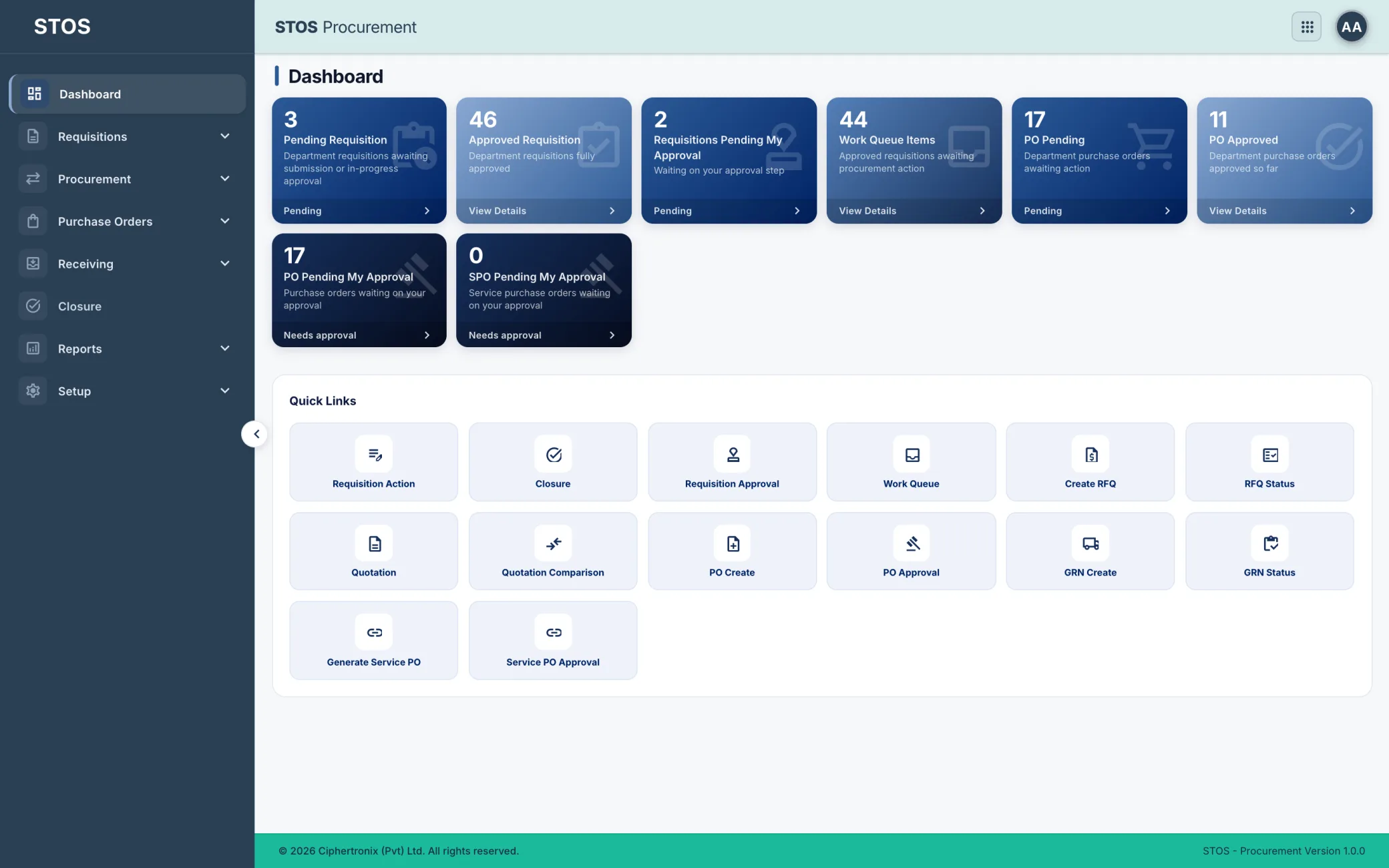
In most operations a requisition starts as a message, approval is a reply, and the quotation comparison that justified the award lives in somebody's mailbox. When the auditor asks why that vendor was chosen at that price, the answer has to be reconstructed. STOS Procurement keeps the requisition, the approvals, every vendor quotation and the comparison that produced the award as records attached to the purchase order.
Rectification and departmental approval
Per item
Each with their own approval
With received and pending quantities
A requisition carries its own category structure and unit of measure, so what is being asked for is unambiguous before anybody prices it.
Raising a requisition line by line with category, sub category, description, unit and quantity. Saved as a draft or submitted, with separate draft, rectified and rejected lists so returned requests are not lost.
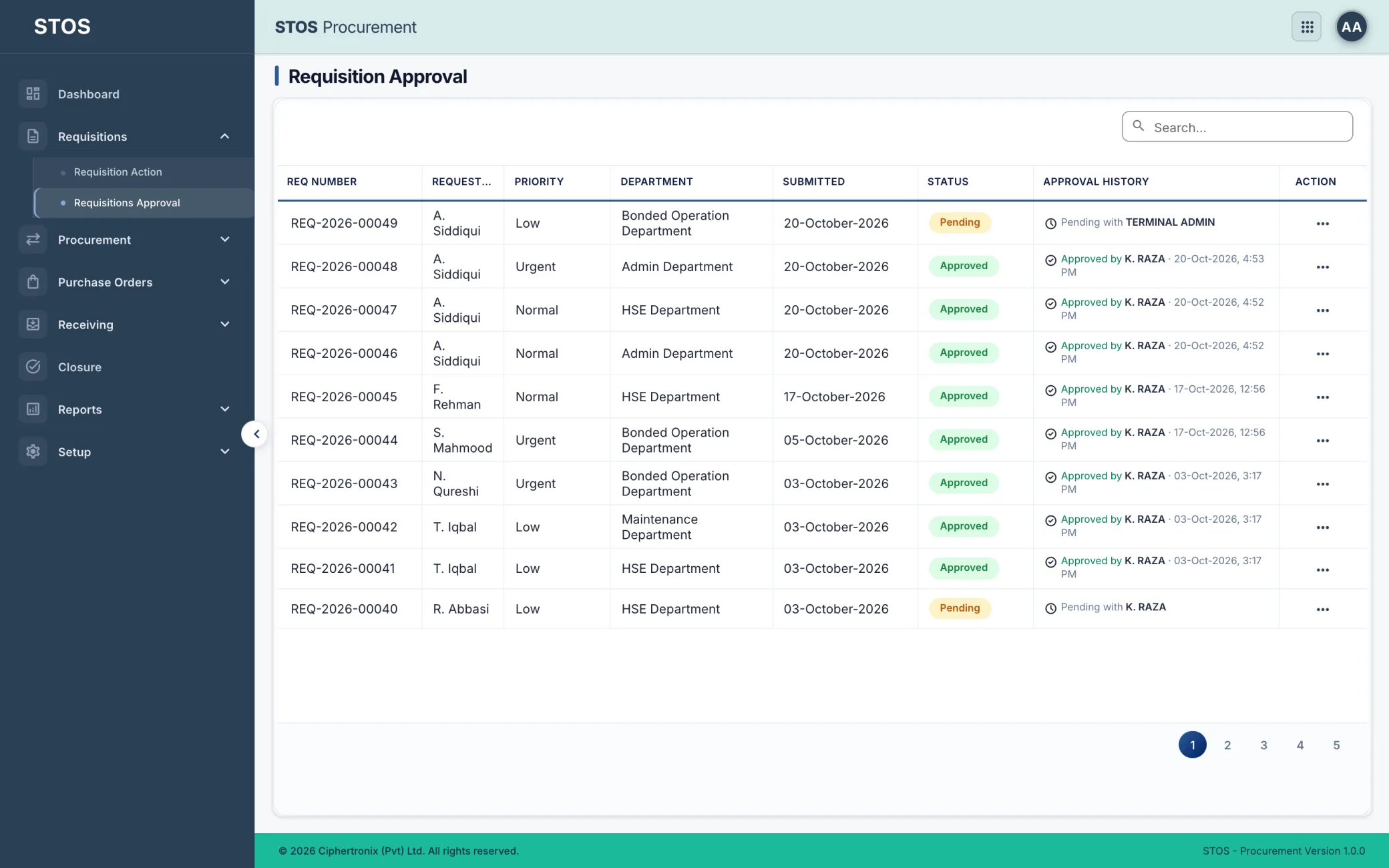
The approval queue with requisition number, requester, priority, department, submitted date, status and the full approval history behind each one.
This is the part that is usually done in a spreadsheet and thrown away. Here the comparison is a record attached to the award.
Approved requisitions awaiting procurement action, with requester, department, request date, required-by date, priority and both approval and procurement status.
An RFQ raised against a requisition, with a closing date and the vendors it goes to, including manually added vendors. Requisition items load straight onto it.
Every RFQ with its requisition, RFQ date, closing date, total items, total vendors and status, with a bulk report for the whole list.
Each vendor's response captured per item: unit price, total, whether the price is fixed, delivery days and warranty days, with the quotation document attached.
Vendors compared per item on quantity, unit, unit price, total price, delivery day and warranty days, so the award is made on the whole offer rather than on price alone.
Service purchasing does not behave like goods purchasing, so it gets its own order type rather than being forced through the same form.
A purchase order raised from the awarded quotation, carrying the requisition and vendor it came from.
Purchase orders waiting on approval, separated from requisition approval so the two gates stay distinct.
Service purchase orders for work rather than goods, raised and approved on their own track.
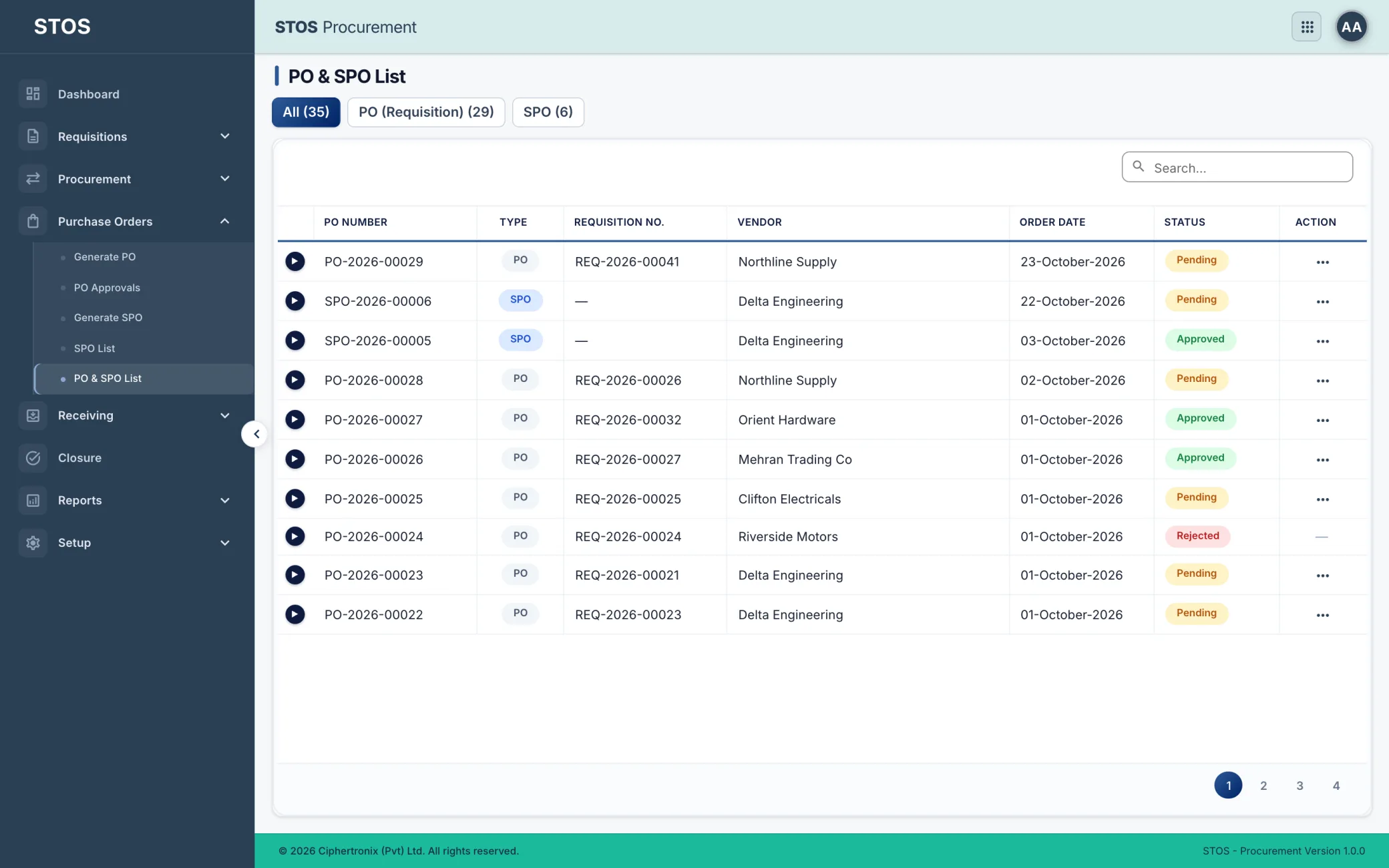
Every order with its number, type, requisition, vendor, order date and status, counted across all orders, purchase orders and service purchase orders.
A purchase order is not finished when it is approved. It is finished when the goods arrive and the requisition that caused it is closed.
Receipt raised against the purchase order, recording what actually arrived rather than what was ordered.
Every receipt with its purchase order, supplier, received date, who received it, ordered quantity, received quantity, pending quantity, status and attachments.
The requisition closed against the purchase order that satisfied it, with vendor, status, remarks and the date it was closed.
Procurement Summary reports over every document type in the module rather than one list at a time.
Filtered by period, department, document type, status, vendor and the user who raised the request. Counts requisitions, RFQs, quotations, orders and receipts for the period, each opening the list behind it.
Nine setup lists define the structure everything else posts against. Categories and category items give requisitions a controlled vocabulary, approval roles define who signs off at each gate, and department assignment decides whose queue a requisition lands in.
Access is granted per module and per role, so two people signed into the same platform see different work.
| Role | What the role works with |
|---|---|
| Requester | Raising requisitions, rectifying returned ones, tracking their own requests |
| Department approver | The approval queue for their department, with full approval history |
| Procurement officer | Work queue, RFQs, vendor quotations, comparison and award |
| PO approver | Purchase and service purchase orders waiting on their approval |
| Warehouse or receiving | Goods receipt against the order, recording what actually arrived |
| Finance | Orders, receipts and the vendor position feeding into Accounts |
| Administrator | Categories, suppliers, units, tax, departments, approval roles and access |
Procurement is not a standalone purchasing tool. It shares the identity service and the supplier master with the rest of the platform, so an approved order and a goods receipt become a payable in Accounts without anyone re-entering it.
It depends on the approval roles configured for the department. The module supports a requisition approval gate and a separate purchase order approval gate, and the full approval history is kept against each document.
It goes to the rectified list rather than disappearing. The requester corrects and resubmits it, and the history of the return stays on the record.
Yes, and that is the point of the comparison screen. Unit price, total price, delivery days and warranty days are shown per item per vendor, so a cheaper quotation with a longer lead time can be judged properly.
Through a service purchase order, which is raised and approved on its own track. Forcing service work through a goods order loses the distinction that matters at receipt.
Goods receipt records what actually arrived. Ordered, received and pending quantities sit on the same row, so a part delivery stays visible until it is completed.
Approved orders and goods receipts feed the Accounts module, so a payable exists against an order that was authorised and goods that were received, rather than against an invoice that arrived by email.
Yes. Modules are licensed individually, and Procurement is one of the more common first additions because the approval trail it produces is usually the one an auditor asks for.
Bring your own customers, tariffs and volumes and we will walk the module end to end on a live system.